Build Your First AI Assistant: A Practical Guide
A step-by-step guide for business owners looking to create their first AI assistant to handle customer service, internal operations, or business processes.
AI assistants are no longer the exclusive domain of large corporations with massive technology budgets. In 2026, a solo founder with the right tools can ship a production-grade AI assistant in two weeks. We've built roughly a dozen of these across very different domains — a barbershop's booking flow, a pediatric therapy clinic's session-note workflow, a construction firm's bid automation, a SaaS internal knowledge search, a consumer app's onboarding coach. The patterns that make an assistant succeed or fail are remarkably consistent across those domains. This guide walks through the patterns that matter, the technology decisions that map to 2026, and the traps that kill most first attempts.
Understanding AI Assistants
An AI assistant is a software system that uses a large language model to understand user requests, gather the right information, take actions, and respond in a conversational interface. Unlike rule-based chatbots that follow pre-written scripts, modern AI assistants reason about the situation in front of them, access external tools, and handle multi-step tasks with ambiguity along the way. The best ones feel less like software and more like a responsive coworker who happens to be available at 3am.
The most common reason first AI assistant projects fail is scope. Founders imagine "an AI that handles our whole business" and build something that does none of it well. The assistants that ship and keep running do one specific job — handle the top 20% of inbound support questions, or structure session notes from a voice memo, or triage sales leads into hot/warm/cold with a next-step recommendation. Specific is what wins.
Defining Your AI Assistant's Purpose
Before writing a single line of code, force yourself to complete this sentence: "When [context], I want the assistant to [action], so I can [outcome]." That's the Job-to-be-Done framing, and it forces specificity in a way that "we need an AI for customer service" never does.
A real example from a recent build: "When a customer sends a message outside business hours, I want the assistant to book them into an available slot and confirm the appointment via email, so I can open the shop in the morning with the calendar already filled." That sentence generated a clear scope — it handles bookings, it works asynchronously, it has a defined action (confirm via email), and everything outside that sentence was explicitly out of scope.
Document your sentence. Pin it above the project. When a feature request comes in six weeks later, the test is whether the request fits the sentence or forces a new one. If it forces a new one, you're scoping a second assistant, not extending the first. The "AI that does everything" anti-pattern is the single biggest reason these projects drift off course — every "could also do..." conversation quietly expands scope until the assistant does nothing well.
Choosing the Right Technology Stack
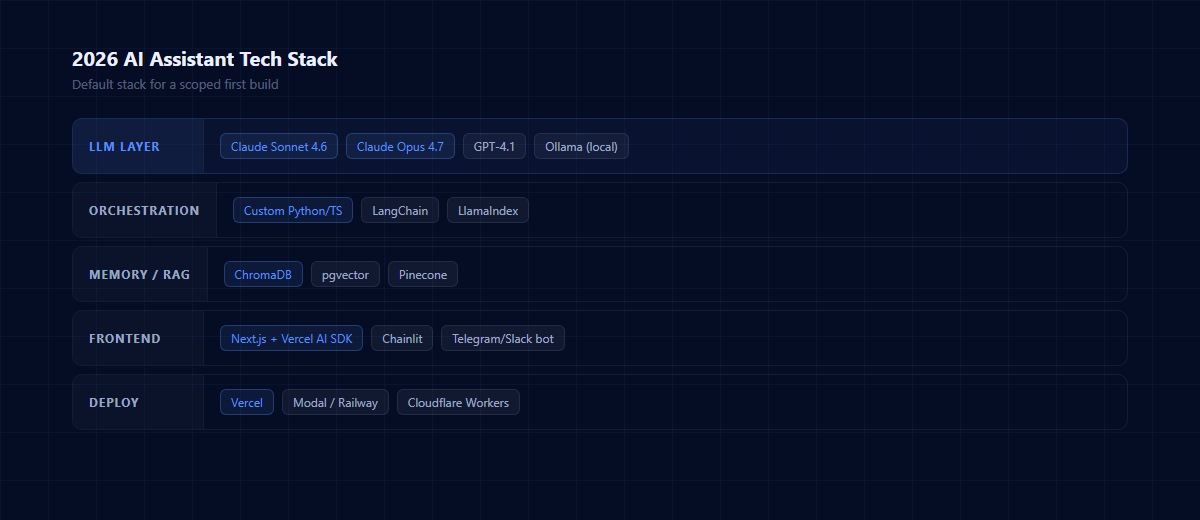
The 2026 stack for AI assistants has converged to a recognizable shape. Here's what we use by default, and why:
LLM Layer
Claude Opus 4.5 or 4.6 for complex reasoning, multi-step tool use, and anything requiring long-context understanding. GPT-4.1 or 5 for broader knowledge coverage when the domain is general. Local models (Ollama running Qwen or Llama 3) for cost-sensitive workloads or strict data-residency requirements where the query never leaves your infrastructure.
Orchestration
Your choice is roughly: Langchain (or LlamaIndex) for the batteries-included framework, or custom Python/TypeScript for full control. We lean custom for most builds. Langchain's docs are excellent reference material, but the framework itself adds abstraction layers that often make a 200-line script feel like a 2,000-line project. If your assistant has fewer than 10 tools, a custom script wins every time on maintainability.
Memory and RAG
ChromaDB for most first builds — fast to set up, free to self-host, good enough for 95% of retrieval needs. Postgres with `pgvector` if you're already running Postgres and want one less service to manage. Pinecone if you need serverless scale-out and don't mind the hosting cost.
Frontend
Next.js with the Vercel AI SDK for a custom web UI. Chainlit or Streamlit for internal tools where UX polish matters less than speed to ship. Telegram or Slack bots for assistants that live in team chat (no frontend at all).
Deployment
Vercel for web frontends. Modal or Railway for Python backends. Cloudflare Workers for edge-cached tool endpoints. The infrastructure piece is where most first-timers overbuild — start with Vercel + a serverless Python function and scale only when you measure a bottleneck.
The warning: over-engineering with Langchain, agent frameworks, or multi-step reasoning chains when a direct API call with a good prompt would do the job. 2026's default path for most first assistants is a single prompt, one or two tool calls, and a simple chat UI. Add complexity only when you measure a specific need for it.
Prompt Engineering Isn't Dead — It's Just Invisible
Some commentary online claims "prompt engineering is dead" in 2026 because frontier models handle vague instructions better than they did in 2023. That's partly true and mostly misleading. Vague prompts still produce vague outputs. The work of shaping the input hasn't disappeared — it's become invisible because the best practitioners internalized it.
The rules that matter, in order of leverage:
- Structure with XML tags. Wrap context in `<context>`, user input in `<query>`, examples in `<examples>`. Models trained on structured input produce more reliable outputs when you give them structured input.
- Explicit role + context + format. Start with a clear role ("You are a pediatric therapy session-note assistant"), provide the context the model needs to do the job, specify the output format (JSON schema if structured, prose requirements if freeform).
- Few-shot examples for complex outputs. Two or three concrete examples of input → output matter more than 500 words of abstract instruction. The model pattern-matches from examples.
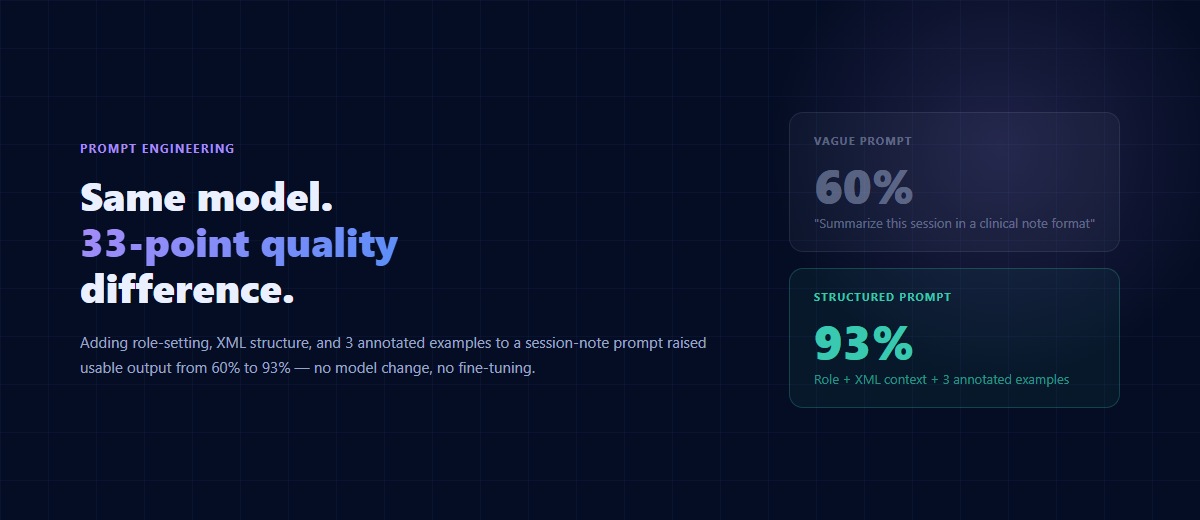
Before/after from a real project: our first prompt for a session-note structuring assistant was "summarize this session in a clinical note format." Output quality: 60% usable. Revised prompt used XML structure, role-setting ("you are a BCBA writing for insurance audit"), and three annotated examples of target output shape. Output quality: 93% usable, requiring only light review. Same model, different prompt, 33 percentage points of quality delta.
For the full pattern library, Anthropic's prompt engineering docs are still the authoritative reference. Read them once, reread the chain-of-thought section anytime you're debugging quality issues.
Data Preparation and Training
AI assistants are only as good as the data they can access and the examples they've been calibrated against. Prepare three data buckets before you start building:
- Knowledge base for retrieval (RAG). Everything the assistant might need to answer questions: product docs, SOPs, FAQ pages, prior ticket resolutions, clinical protocols, pricing sheets. Chunk these into 500-1000 token sections, embed with OpenAI's `text-embedding-3-small` or similar, store in your vector DB. Include metadata so retrieval can filter by source, date, or category.
- Example interactions for tone calibration. 15-30 real or curated conversations showing how the assistant should talk — voice, register, formality, warmth. These become your few-shot examples in the prompt.
- Tool schemas for actions. For every action the assistant can take (book appointment, send email, create CRM entry), write a JSON schema that defines inputs, outputs, and error cases. Tool schemas are the API of your assistant — invest in them like you would any API.
A concrete trap: teams compile their knowledge base, forget about the tone examples, and ship an assistant that knows everything but talks like a Wikipedia article. The tone bucket is the one first-timers most often skip, and it's the one users notice first.
Building the Conversation Flow
State-Machine Thinking: The Core Pattern
The most common mistake in conversation design is open-ended intake. An assistant that opens with "How can I help?" hands the user a blank page and creates friction. The better pattern is state-machine thinking: define explicit states the conversation can be in (initial → gathering info → clarifying → executing → confirming → done), and design each state with narrow, specific prompts.
Narrowing the Input Space
For a booking assistant, the initial state isn't "How can I help?" — it's "I can book you an appointment. What day are you thinking?" That reduces the space of possible next user actions from infinity to roughly three (a day, a question about availability, or "I'm not trying to book"). Handling three branches is vastly easier than handling infinity.
Always Include a Human Escalation Path
Build explicit escalation paths for situations the assistant cannot handle — always include a "talk to a human" option visible in every state. The goal isn't to replace human interaction; it's to handle the routine 80% so your team focuses on the complex 20% that genuinely needs human judgment.
Testing, Evals, and Monitoring
This is the section most first-time builders skip, and it's the one that separates assistants that stay valuable from assistants that quietly degrade into noise. AI assistants rot. The world changes, your product changes, the underlying model gets upgraded, and the assistant that was great in month one is subtly worse by month six unless you have an evaluation loop running.
Eval framework for a first build:
- Golden dataset. 50-100 inputs with expected outputs (or expected behavior) — the kinds of queries your assistant absolutely has to handle correctly. This is your regression test suite.
- LLM-judge automated evals. Have a second model (usually Claude or GPT-4) score assistant outputs against criteria like accuracy, tone, completeness. Run nightly on a rolling sample of production queries. This catches drift.
- Human spot checks weekly. 10-20 real conversations, reviewed by you or a team member, scored 1-5. Human judgment still outperforms LLM judges for nuanced quality — but doesn't scale, so combine both.
Production monitoring: track latency (p50, p95, p99), token cost per conversation, error rate, tool-call failure rate, user-reported issues. Tools to consider: Braintrust, Phoenix by Arize, LangSmith, or a custom dashboard in Metabase. Even a Google Sheet beats no tracking at all. Pick something you'll actually look at weekly.
One more lever: every user interaction with a "this was unhelpful" button feeds directly into your improvement backlog. The feedback button is the cheapest eval infrastructure you can build, and it captures user-defined "bad" — which is the only kind of "bad" that matters.
Real Case Study: Pediatric Therapy Session-Note Assistant
One of our 2025 builds: a pediatric therapy clinic needed to compress 30-60 minutes of daily session-note writing down to 5 minutes of review. The clinical team was burning out on documentation and losing experienced staff to less paperwork-heavy jobs.
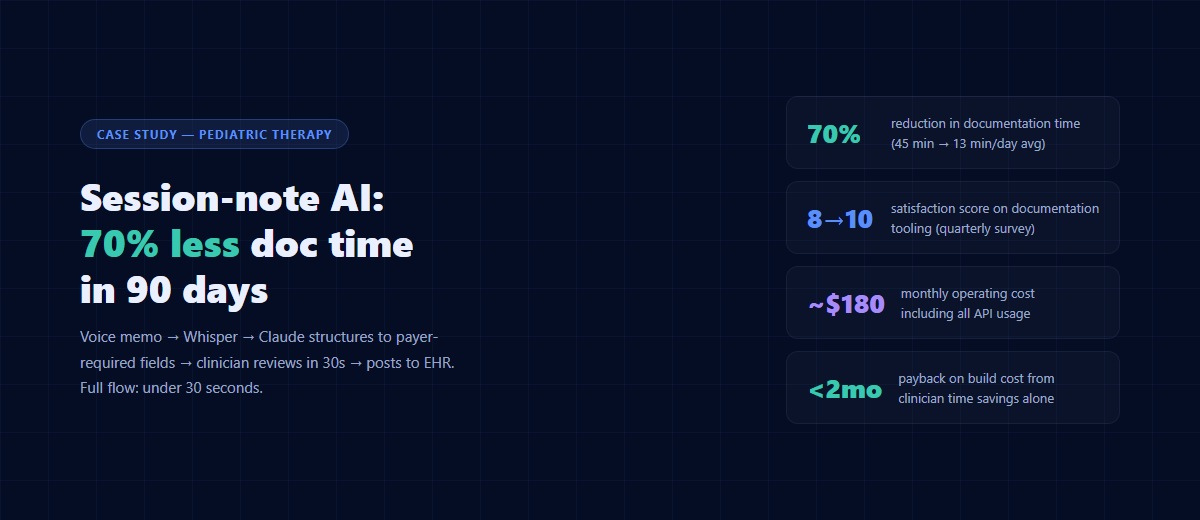
Architecture: voice memo from clinician → Whisper transcription → Claude structures the transcript against the payer's required note fields (behavior definitions, target data, medical necessity, progress toward goals, supervision documentation) → clinician reviews and approves → note posts to the EHR via API. The whole flow runs in under 30 seconds per note.
Hard parts:
- Getting the note structure right took two weeks of prompt iteration. The difference between "mostly right" and "audit-ready" was three specific XML sections in the prompt and a dozen concrete examples.
- HIPAA compliance meant enterprise-tier Anthropic + signed BAA, encrypted storage, and a minimum-necessary data policy that excluded patient identifiers from the Claude call (they're added server-side after structuring).
- Clinician adoption — mandating the tool would have killed it. We let three champion clinicians use it for two weeks, collected their feedback, and only rolled it to the rest of the team once they had social proof.
Outcomes (measured at 90 days): documentation time dropped 70% (from 45 min/day average to 13 min). Clinician satisfaction with documentation tooling rose from 4/10 to 8/10 on quarterly survey. Two clinicians told the owner they'd have quit without the tool. Monthly operating cost including API usage: roughly $180. Payback on the build: under two months.
That's what a well-scoped first assistant looks like. One job, measured results, real clinician lift, boring infrastructure, tight eval loop.
Integration with Existing Systems
The value of an AI assistant multiplies when it integrates with the systems your business already runs on. Connecting to your CRM, scheduling software, knowledge base, or billing system lets the assistant perform meaningful actions, not just chat. API-based integrations are the most flexible and maintainable path — they're what your tools almost certainly already support, and they keep your assistant's behavior testable in isolation.
The rule of thumb on integrations: start with read-only access. Let the assistant surface data from your CRM before you let it write data into your CRM. One-way data flow catches most of the mistakes cheaply, and the write permissions can layer in once you trust the read behavior. For a practical list of the highest-ROI integrations to build first, see AI workflows that save small businesses 10+ hours a week.
Security and Privacy Considerations
Any AI assistant that touches customer data — names, emails, purchase history, and especially health or financial data — needs security designed in from day one, not bolted on after launch. Encrypt data at rest and in transit. Implement role-based access for anyone who can see conversation logs. Sign BAAs with your AI vendors if you handle PHI; sign DPAs if you handle EU user data. Consult a security professional to audit your implementation before the assistant goes live with real user data.
One specific watch-out for 2026: don't send raw PII to consumer-tier AI APIs. Free ChatGPT and free Claude don't offer the same data-handling guarantees as their enterprise tiers. For anything touching customer data, use enterprise tiers with signed agreements.
Frequently Asked Questions
How long does it take to build a first AI assistant?
Scoped tightly, 2-4 weeks from kickoff to internal launch. Add 2-4 more weeks for production hardening, eval infrastructure, and user feedback incorporation. Assistants that aim broader ("handle all customer service") routinely take 3-6 months and often don't finish — scope discipline is the single biggest lever on timeline.
What does a first AI assistant cost to build?
Custom builds: $10,000-25,000 for a scoped first assistant if you hire a contractor, $0 in labor if you build it yourself (expect 80-120 hours if you're technical). Running costs: $50-500/month depending on volume and model choice. Smaller operational footprints are viable for internal tools; higher volumes justify caching, cheaper-model routing, or self-hosted models.
Which model should I start with?
Claude Opus 4.5 or 4.6 for reasoning-heavy work (agents, multi-step tools, long-context). GPT-4.1 or 5 for broad-knowledge general assistants. Both are production-grade in 2026. Start with whichever your stack already supports — the difference between the top two is much smaller than the difference between a well-designed prompt and a sloppy one.
Do I need to train a custom model?
Almost certainly not. Fine-tuning made sense in 2022-2023. In 2026, frontier models with good prompting, RAG, and example-driven few-shot outperform most fine-tunes for a fraction of the cost and operational complexity. Start with the base model and good prompt engineering; reach for fine-tuning only if you exhaust prompt-level wins and have a large, high-quality training dataset.
How do I know if my assistant is actually working?
Three signals: your golden-dataset evals pass >90%, real users use it more week over week without prompting, and the metric you built it to move (time saved, tickets deflected, bookings captured) is measurably up. If any of the three is flat, you have an issue to diagnose — usually prompt quality or scope creep.
Conclusion
Building a first AI assistant is a solved problem in 2026. The stack has converged, the models are production-grade, and the patterns that make an assistant succeed have been battle-tested across thousands of shipped projects. The hard part isn't technical — it's scope discipline, honest evaluation, and the patience to ship one specific job extremely well before reaching for the next.
If you're planning your first assistant and want to talk through the right scope, stack, and timeline for your business, book a free 30-minute consultation. Bring the job you want it to do, and we'll map out what it takes to ship.
About the author: Gabriel Jaramillo is the founder of Auth Software and a Board Certified Behavior Analyst. He has 7 years of frontend design and full-stack development experience. The AI-assistant framework in this article comes from shipping a dozen production assistants across healthcare, small business, and consumer apps since 2023 — and from learning the hard way which patterns hold up and which collapse under real use.
Continue reading
The BCBA's Guide to HIPAA-Compliant ABA Practice Management (2026)
Most ABA agencies assume they're HIPAA compliant because they use CentralReach. They're usually wrong — not about the EHR, but about everything around it. A plain-language breakdown of what HIPAA actually requires for ABA practices, where most agencies have gaps, and how to close them.
AutomationCentralReach vs. Custom ABA Software: When Your Practice Has Outgrown Off-the-Shelf
CentralReach is the dominant EHR in the ABA market for good reason. But there's a specific set of scenarios where it stops being the right choice — and when practices hit those scenarios, they usually don't realize it until they've already built a year's worth of workarounds.
AutomationHow ABA Agencies Are Automating Billing, Intake, and Supervision Tracking with AI (2026)
The average ABA agency running 20 active clients has at least three manual workflows that consume 10–15 hours of admin time per week: authorization renewals, new client intake, and BACB supervision tracking. In 2026, all three are automatable. Most practices haven't automated any of them.